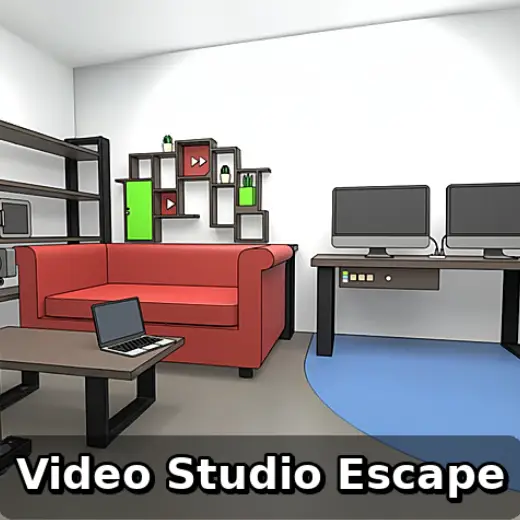
Video Studio Escape
About This Game
Video Studio Escape (Play + Guide)
1. Introduction
Video Studio Escape drops you into a locked production space where every prop can be a clue, and every clue is a step toward the exit. The fun is in turning “set dressing” into a plan: scan the room, collect items with a purpose, and convert partial hints into a final code.
Play Now: Launch Video Studio Escape in your browser and start checking props for hidden switches, numbers, and patterns.
If you are on a modern browser, this typically plays like an online/browser game with quick clicks and simple UI prompts.
2. Key Features
Compact escape room layout, with props that double as puzzle components.
Inventory based item combining, typically rewarding careful order of operations.
Mixed clue types, including numbers, symbols, and color or shape matching.
Logical progression that feels like an Escape room video game, not random guessing.
Clear fail state avoidance, you usually lose time through mistakes, not instant death.
Smooth replay loop, letting you re check earlier rooms when a new hint appears.
3. What is Video Studio Escape?
Video Studio Escape is an escape room style online/browser game set in a studio environment, where your role is to investigate, collect, and solve your way out. The core loop is simple: tap around the scene to find interactable objects, store them in inventory, then use them to unlock new clues, tools, or doors.
The tactical dynamic comes from how clues are distributed. One puzzle often references another, so progress is less about one “big” riddle and more about connecting small observations. What makes it distinct is the theme, studio props like cameras, lights, and production notes can plausibly hide codes or patterns, which encourages a methodical “set walk” mindset.
4. How to Play
Your objective is to escape the studio by solving a chain of puzzles that lead to door keys, keypad codes, or lock combinations. In most versions, the game does not punish you with hard failure screens. Instead, you “fail” by getting stuck, misreading a hint, or using an item in the wrong place and wasting time.
Typical progression looks like this:
Search the room, collect obvious items, and note anything with numbers or symbols.
Open small containers and panels as soon as you have the right tool.
Use newly revealed clues to solve a lock, which reveals the next tool or code.
Repeat until the exit opens.
Controls
Action | Mouse and Keyboard | Touch (Mobile/Tablet) |
|---|---|---|
Look for hotspots | Move cursor, click highlighted objects | Tap objects and scene areas |
Pick up item | Click item to add to inventory | Tap item to collect |
Use item | Select inventory item, then click target | Tap item, then tap target |
Combine items | Select item, choose combine (if available) | Tap item, use combine option |
Enter codes | Click keypad or lock, type digits | Tap keypad, tap digits |
Reset view or step back | Use on screen back arrow (if present) | Tap back arrow or UI button |
Micro cue: If your clicks stop registering on a prop, back out one screen and re enter, many rooms refresh hotspots after a puzzle completes.
5. Core Gameplay Mechanics
1) Main system When you click around the set, the game reveals hotspots that either grant items, show clue panels, or open a new interaction window. When you collect an item, the inventory becomes your “toolbox,” and the game expects you to test that tool on likely targets. If an object looks “out of place,” it is often a lock, cover, or switch.
2) Tactical dynamics When you see a puzzle with missing information, do not brute force. Instead, identify what the puzzle is asking for, then hunt specifically for that input. When a panel shows symbols, immediately check posters, note cards, or gear labels for the same symbols. Micro cue: If a keypad accepts input but you lack the pattern, you usually missed a nearby note.
3) Progression and scaling Early puzzles typically teach the interaction language, open drawers, simple codes, and one item use. As you progress, clues become more “cross room,” meaning you might find a sequence in one view that solves a lock in another. Difficulty ramps through dependency chains rather than complexity, you are managing information, not doing advanced math.
4) Key elements Your key resources are attention and inventory space. Hazards are mainly time sinks: misreading symbol order, ignoring color direction, or forgetting to re check a previously locked container after gaining a tool. The fail state is being stuck, which is usually fixed by re scanning for a missed hotspot or re interpreting a clue.
Decision Flow (Quick Win Rule) See a locked object? Yes -> Do you have a matching item? Yes -> Use item -> Read new clue -> Note order No -> Search nearby props -> Collect tools -> Re check lock
6. Strategies
Full Set Sweep Do a slow, complete click pass across every scene before you commit to a single puzzle. The goal is to collect all “free” items and surface all locks early. It works because escape games often gate progress by one missing tool. Warning: Do not spam clicks on the same hotspot, you can lose track of what you already checked.
Clue Ledger Notes Write down every number string, symbol set, and color order the moment you see it. Then label it by location, like “desk note” or “camera case.” This works because later locks often reuse earlier patterns. Warning: If two clues look similar, double check the order arrows or left to right reading direction.
Inventory Intent Check Each time you pick up a new item, pause and ask what it is “for.” Keys go to doors, handles go to panels, batteries go to devices. This works because item use is typically literal in an online escape room. Warning: If an item does nothing, try it on the most recently discovered lock, not random old ones.
Solve the Obvious First Prioritize puzzles that have clear inputs, like a keypad with a nearby note, or a lock with an obvious missing piece. Clearing these quickly expands the room state and reveals more clues. Warning: If you cannot solve a puzzle in 60 seconds, park it and hunt for a missing hint.
Pattern Matching Over Guessing When you find symbols on a safe, look for the same symbols elsewhere before you touch the safe. Many “answers” are not standalone, they are translations, such as icon to number or color to direction. Warning: Do not assume common escape room rules, follow what the room actually shows.
Backtrack Trigger After any major unlock, immediately backtrack to every previously seen locked container. New tools often exist only to open older locks. This works because designers create circular routes to keep the room compact. Warning: Re open the inventory, you might forget you gained a tool because it looks like a normal prop.
Experience cue: If you are stuck, look for a prop that changed state, such as a drawer that is now slightly open or a panel that now shows a new icon.
7. Similar Games
Game Cafe Escape – Cafe themed puzzles with inventory combines and lock sequences.
Computer Office Escape – Office props, keypad codes, and clue chaining across screens.
Machine Room Escape – Industrial style puzzles focused on switches, parts, and panels.
Elevator Room Escape – Small space escape with tight backtracking and code entry.
If you want more brainy escape challenges, explore Puzzle. https://gamexplains.com/puzzle
For more deduction focused rooms and pattern rules, explore Logic. https://gamexplains.com/logic
8. FAQ
How to find escape room answers? The best way is to identify what information a lock needs, then search for that specific input. Scan for repeated symbols, number strings, and directional hints, and write them down. If you are stuck, backtrack after every unlock because new items commonly open older locks.
Are virtual escape rooms any good? Yes, virtual escape rooms can be good when they reward observation and logical chaining instead of guessing. A well designed browser version keeps puzzles readable, gives clear feedback on locks, and makes backtracking easy. If the UI is confusing, your “difficulty” may be navigation, not the puzzles.
What is the world's scariest escape room? There is no single official “world’s scariest” escape room because fear is subjective and many venues change rooms over time. Typically, extreme horror experiences combine darkness, loud audio, and intense themes. For games like Video Studio Escape, the tension is usually from problem solving pressure, not scares.
What are the 7 common escape room puzzles? Common types include: hidden object searches, combination locks, pattern matching, symbol to number ciphers, light and color puzzles, sequencing tasks, and item assembly. Many rooms also use directional clues and simple logic grids. In most escape games, the trick is ordering, solve the right puzzle at the right time.
9. Technical
Video Studio Escape is typically an HTML5 game (may use WebGL) that runs directly in the browser as an online escape room experience. It usually works best on current versions of Chrome, Firefox, Safari, or Edge.
Performance: most mid range devices should run it smoothly, but older phones may stutter when scenes include layered UI panels.
Controls: this is generally point and click on desktop and tap based on mobile. If you are playing the browser version, it is commonly a no download experience, meaning you start instantly without installing anything.
Micro cue: If text on a clue is hard to read, try full screen mode or zoom in, then zoom back out before entering a code.
10. Final Verdict
Video Studio Escape is a solid escape room style online/browser game for players who like careful searching, tidy clue chains, and inventory logic. Its strengths are the compact pacing and the theme, studio props make clues feel grounded. The main limitation is that getting stuck can feel abrupt if you miss a tiny hotspot, so note taking and backtracking matter.
If you want a clean, low friction escape room video game you can start quickly, this is a good pick. Open it, do a full sweep, and treat every prop as potential information.
Google Play: https://play.google.com/store/apps/details?id=com.masasgames.videostudioescape&hl=en_US
App Store: https://apps.apple.com/us/app/video-studio-escape/id1633549765
Comments (0)
No comments yet. Be the first to share your thoughts!